
MoxKit Changelog
Updated · MoxKit 1.4.4 · Download free on WordPress.org
The MoxKit changelog lists every change to MoxKit Addons for Elementor, newest first. Update from Dashboard > Updates or download the latest version from WordPress.org.
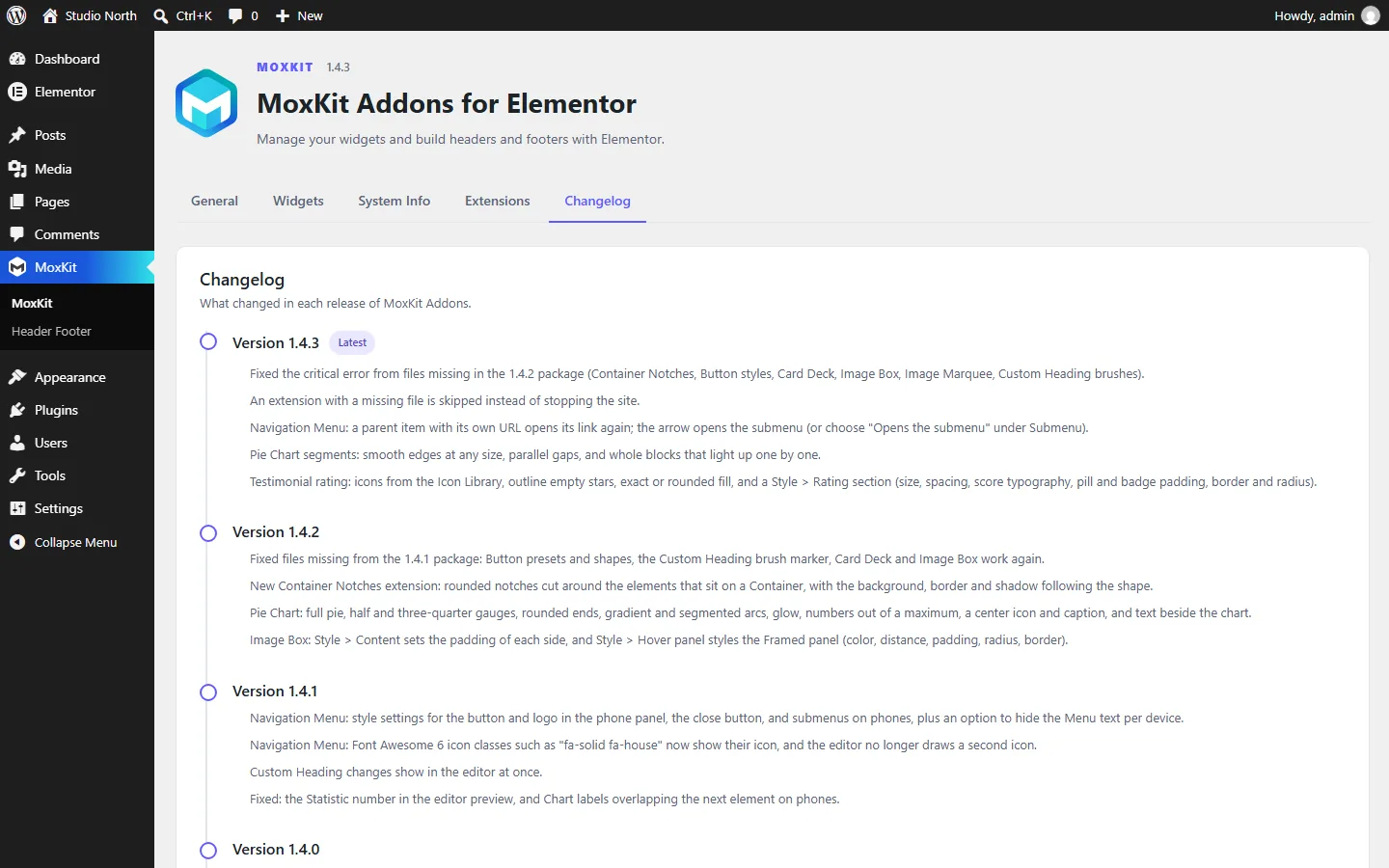
Table of contents
How to read the MoxKit changelog
Each entry starts with a label: New for features, Improved for better behavior, Changed for changes you may notice, Fixed for bug fixes and Security for hardening. The same list is in the plugin under MoxKit > Changelog.
Version 1.4.4
- Fixed The 1.4.3 package was missing files, so the Image Box and Card Deck widgets did not appear, Container Notches was unavailable, Button presets and shapes had no styles, Image Marquee did not scroll, and the Custom Heading brush marker did not show. All files are included again.
Version 1.4.3
- Fixed A critical error on every page after updating to 1.4.2, because the package was missing files (Container Notches, Button styles, Card Deck, Image Box, Image Marquee and the Custom Heading brushes).
- Improved If an extension's file is missing, the extension is now skipped instead of breaking the site.
- Fixed Navigation Menu parent items with their own URL can be opened again. Clicking the text opens the link and the arrow opens the submenu; a new Submenu setting, "Clicking a parent item", brings back the old behavior. Parents linked to "#" still open their submenu.
- Improved Pie Chart segments have smooth edges at any size, gaps with parallel sides, and light up whole blocks one by one instead of cutting the last block.
- New Testimonial rating icons from the Elementor Icon Library (with an optional empty icon), outline empty stars, and exact, half or whole star fill.
- New Testimonial Style tab > Rating: star size and spacing per device, space below, score typography, and padding, border and radius for the pill and badge.
- Improved Testimonial stars are icons instead of text characters, so they look the same in every font and half stars line up.
Version 1.4.2
- New Container Notches extension (Style > Notches): rounded notches cut around absolute-positioned or marked elements, opening to the nearest edge, with the background, border and shadow following the shape. Enable or disable it under MoxKit > Extensions.
- New Pie Chart shapes (full pie, half and three-quarter gauge), rounded ends, gradient and segmented arcs, glow, start angle and direction, a number out of a maximum with decimals, prefix and suffix, a center icon and caption, a description, label beside the chart, and easing and duration choices. The ring center is now transparent; set Center background to fill it.
- New Image Box Style tab > Content with padding for each side, per device. The earlier single padding slider moved there too and still applies when the new padding is empty.
- New Image Box Style tab > Hover panel for the Framed panel design: panel color, distance from the edges, padding, border radius and border. The reveal keeps the rounded corners.
- Fixed The 1.4.1 package was missing files, so Button presets and shapes had no styles, the Custom Heading brush marker did not show, and the Card Deck and Image Box widgets were unavailable.
Version 1.4.1
- New Navigation Menu style settings for the button and logo inside the phone panel, the close button (icon, colors, size, position), and submenus on phones.
- New Navigation Menu option to hide the "Menu" text next to the hamburger, per device.
- Improved Font Awesome 6 classes in a menu item (for example "fa-solid fa-house") now show their icon.
- Improved Custom Heading changes show in the editor at once, without waiting for the server.
- Fixed The editor no longer draws a second icon next to Navigation Menu items that use an icon class.
- Fixed The Statistic number could show as template code in the editor preview.
- Fixed Chart labels overlapped the element below on phones.
Version 1.4.0
- New Image Box widget with eight interactive banner designs; the whole box is one link.
- New Button presets (12), shapes (15), hover effects (16), icon animations, attention loops, and click effects.
- New Navigation Menu on phones and tablets: toggle styles, panel animations (side, top, bottom, fade, circle), drawer width, page effects, staggered items, drill-down submenus, and a logo and button in the panel.
- New Navigation Menu on desktop: nine more pointers, hover dimming, hover-intent submenus, card and caret submenus with descriptions, badges, mega menus with image cards, vertical accordion and icon rail, search and a button, a sticky, shrinking, or hiding header, a transparent header, reading progress, and one-page scroll highlighting.
- New Testimonial with several quotes: 11 designs, grid, carousel, moving row, and avatar picker layouts, half-star ratings, highlighted words, and a rating summary.
- New Flip Box effects: jelly flip, liquid blob, paint drip, rising tide, frosted dissolve, and a swirl style for the liquid morph.
- New Team Member designs (caption strip, reveal, float, glass, side, ribbon), rating badge, and photo filters.
- New Advanced Image scroll reveals: liquid swirl, wipe, iris, diamond, curtain, blinds, tiles, and brush.
- New Custom Heading bar and brush markers that draw in from the left, right, or center.
- Improved The Flip Box liquid morph is smoother: soft, rounded distortion instead of torn edges, eased timing, and less work for the browser on each frame.
- Changed The open Navigation Menu dropdown on phones now spans the screen by default. Choose "Widget" under Dropdown width to keep the previous width.
- Fixed Video, Flip Box, and Image Box no longer collapse to zero width inside row containers.
- Fixed Liquid Glass, Waves, Shape Divider Animation, and Custom Cursor keep working after Elementor caches a page that was first rendered outside a normal visit (for example through the REST API).
Version 1.3.2
- Fixed The 1.3.1 package on WordPress.org was still missing the Card Deck files, the Image Marquee Arc script, and the uninstall routine, which caused a critical error on sites with Elementor's Nested Elements feature active.
- Changed A widget whose file is missing is now skipped instead of stopping the page, and a missing script or stylesheet no longer fills the PHP error log with warnings.
Version 1.3.1
- Fixed The 1.3.0 package was missing the Card Deck files, the Image Marquee Arc script, and the uninstall routine, which caused a critical error on sites with Elementor's Nested Elements feature active.
- New Every MoxKit widget has its own icon in the Elementor panel, drawn for MoxKit and sized to match Elementor's icons.
Version 1.3.0
- New Card Deck widget: a stack of cards that deals its front card to the back on a timer, by swipe, or with previous/next buttons and dots, with a pause button and pause on hover. Every card is an editable Container, so it can hold any widgets. Stack step, shrink, tilt, darkening, exit direction, speed, and card, button, and dot styles are adjustable.
- New Vertical Accordion designs: Strip tabs, Image reveal, Numbered spine, and Color block, next to the Classic title bar. Per-panel image, color, and title color; open on click or hover; the title hidden or shown in the open panel; the panel number beside the title, as a chip, or as a large background numeral; muted closed panels, a bottom shade over images, dividers, and a rounded group.
- New Vertical Accordion animation settings: panel duration and easing, and a content entrance (fade, rise, drop, slide, zoom, or blur) with its own duration and delay. Panels now close with an animation too, content keeps its final size while a panel grows so text no longer reflows on the way, and stacked and mobile panels open and close by height.
- New Image Marquee Arc (ellipse) shape: images travel along an arch or a bowl, with a per-device depth, optional tilt along the curve, and size and opacity toward the ends.
- New Image Marquee alignment (top, middle, bottom; left, center, right for the vertical marquee) per device, and an automatic image height for rows of mixed ratios.
- New Vertical Accordion panel number formats (01, 1, I, A) with text before and after, and number styling: typography, colors, opacity, offset, and chip padding, radius, and border.
- New MoxKit Waves wave height can be set per device.
- New Vertical Accordion with editable nested Containers: expanding desktop panels that work like tabs (or a stacked layout), responsive mobile headers on the Elementor breakpoints, per-device spacing, single or multiple open panels, library icons per title and for the open/closed indicators, title-number typography, keyboard controls, and reduced-motion support.
- New Post Categories widget: categories, tags, or any public taxonomy as a list (optionally nested), pills, cards, or count tiles; one icon for all or an icon, color, and name per term; post counts in three formats; a palette or one accent color; the current category highlighted; lift, slide, fill, or glow hover.
- New Popular Posts widget: rank by views, comments, date, last update, or random, filtered by category or tag and by publish date; numbered list, ranking, cards, image overlay, or featured layouts, stacked, side by side, or in a swipeable row with previous/next buttons; rank numbers in seven looks and four color schemes (one color, medals, a first-to-last blend, or a palette); date, views, comments, author, category, and reading time.
- New Post View Counter extension (off by default) that counts post views for Popular Posts; editors, previews, prefetches, and bots are not counted. Other view counter plugins can be used through their custom field.
- Fixed In the editor, a new Custom Heading text-mask image (or gradient, size, or font) did not show on animated words until the page was reloaded, and the text could stay empty while the image was loading.
- Fixed In the editor, Process Showcase connectors between rows did not follow changes to their thickness, gap, or speed until the page was reloaded.
- New Custom Heading rebuilt: the heading is made of parts, each with its own font, color, gradient, image text mask (background image showing through the letters), or outline, a highlighter or underline marker with its own color, height, position, corner radius, and width, and its own animation. Images can sit between words. The whole heading animates as one block or by part, word, letter, or typewriter, with 11 effects, triggers on scroll, every time it scrolls into view, on page load, or on hover, and looping float, pulse, wiggle, wave, flowing fill, shine, or spin. The eyebrow and description are gone (use separate widgets); headings already on your pages keep working unchanged.
- New MoxKit Waves extension for Containers and Sections (Style > MoxKit Waves): seamless animated wave dividers in six styles with up to three layers, per-layer colors and opacity, flow, flow with rise and fall, or liquid motion, top, bottom, or both. Enable or disable it under MoxKit > Extensions.
- Changed Each widget now loads only its own stylesheet plus a small shared one (3 KB) instead of one 86 KB file for all widgets.
- Changed Fewer database queries on every page: MoxKit settings load together with WordPress's own settings, and the header/footer lookup reads only templates of the needed type.
- Changed Animated Shape Dividers pause while they are off screen.
- Changed Deleting the plugin now removes its settings and the post view counts (on every site of a network). Templates and page content are kept.
- Fixed In the editor, each change to a Countdown left the previous timer running.
- New Animated Shape Divider extension for Containers and Sections (Style > Shape Divider Animation): a seamless flow (the shape is rebuilt so its ends meet), tide, breathe, or sway per side, with direction, speed, strength, a second layer for depth, and pause on hover. Enable or disable it under MoxKit > Extensions.
- New Advanced Rating can use any icon from the Elementor Icon Library, with an optional separate icon for unfilled ratings (for example a solid and an outline star).
- New Chart vertical bars can show the label and value beside each bar, on the right or left: across at the bottom of the bar (label above value, like a vertical progress bar), next to its top, or up along the bar. A track color draws a full-height rail behind each bar, and bars can be as thin as 2% of their slot.
- Fixed Custom Cursor in the Elementor editor only followed the pointer over widget content, not across the whole Container.
- New Advanced Rating widget: stars, rounded stars, hearts, circles, or any library icon on a 1–10 scale; exact, half, or whole-icon fill; scores as 4.6, 4.6/5, 4.6 out of 5, or 92%; title and review count; three layouts; fill, pop, and rise entrance animations; icon hover effects.
- New Custom Cursor extension for Containers (Advanced > Custom Cursor): 18 browser cursors, or a dot, trailing ring, ring, blend circle, spotlight glow, text bubble, or image that follows the pointer, with trailing, link-hover, and click effects. Enable or disable it under MoxKit > Extensions.
- New Chart horizontal bars with the label left, right, or above the bar and the value at the bar end, inside the bar, on the opposite side, or next to the label; track color, row spacing, and label column width.
- New Chart value prefix and suffix; value position above the bar or point, inside the bar, above or below the label, or left or right of the label; long labels wrap or are cut off with side spacing; Donut Center shows the total or custom text with a caption and its own typography, colors, and background.
- New Accordion open/close animations (slide, slide + fade, zoom, rise, drop, blur, 3D unfold) with duration and easing.
- New Accordion Title box with Normal, Hover, and Open tabs for title color, background, border color, and shadow.
- New Process Showcase badge border type and an adjustable outer ring.
- Changed Chart values and labels are HTML text, so they keep their real font size and the Site Settings global fonts at any chart width.
- Fixed Image Marquee and Text Marquee links did not respond on the repeated copy that keeps the loop seamless.
- Fixed Chart labels overlapped, and value and label sizes shrank or grew with the chart width.
- Fixed Icon colors, including the Secondary color on hover, were replaced by the Site Settings link colors when the icon had a link.
- Fixed Process Showcase badge border stayed invisible until a border color was set.
- Fixed Navigation Menu was hidden on the live page whenever a pointer effect was selected.
Version 1.1.0
- New Icon widget with Elementor library icons in default, stacked, or framed styles; layered filled pulses, outline ring pulses, glow, and a turning dashed ring; looping icon animations and hover effects; full style controls.
- New Liquid Glass extension for Containers (Style > Liquid Glass) with nine presets, customizable refraction, bezel, blur, edge shine and radius, a frosted fallback outside Chrome and Edge, and per-device options. Enable or disable it under MoxKit > Extensions.
- New Flip Box liquid morph effect (ripple, melt, or wave), click/tap/keyboard trigger, Front and Back Background and Background Overlay (image, gradient, opacity, blend mode, CSS filters), and full typography, padding, border, shadow, and alignment controls.
- New Counter (formerly Statistic) with the icon on the left, right, top, or bottom, a styleable content box, ten number animations (count up with easing, odometer, slot machine, scramble, typewriter, wave, flip, drop, blur focus, none), and prefix/suffix styling.
- New Process Showcase per-step buttons with icons, number or icon + number badge markers with advanced badge styling, responsive columns, connectors that continue, snake, or fade between wrapped rows, animated connectors (light beam, flowing dashes, travelling dot, draw on scroll), and step box width, margin, and styling in every layout.
- New Chart color modes (single, per item, gradient) with per-item overrides that accept global colors, bar thickness and rounded corners, smooth lines, point styles (hollow, filled, ring, square, diamond, none), area fills (vertical, horizontal, or blended item colors), entrance animations for bars, lines, areas, and donuts, and a chart box.
- New Accordion icons from the icon library (closed and open), animated plus/minus and chevron indicators, eleven hover animations, and a full Icon style section.
- New Advanced Image now mirrors Elementor's Image widget (image resolution with srcset, attachment captions, media file link with lightbox, width, max width, height, object fit and position, opacity and CSS filters for normal and hover), plus Ink bleed and Liquify scroll reveals, Spin 360 loops, and a reveal duration.
- New Missing style controls added to Countdown (finished message), Steps, Statistics, Team, Video, Pie Chart, and Pricing.
- New MoxKit widgets show Material Symbols icons and a "mox" badge in the Elementor panel.
- Changed Button box settings now live inside the Button section as padding and border radius; the padding default is shown and can go down to 0.
- Changed Chart, Advanced Image, and Icon previews in the editor are rendered by the server so they always match the live page.
- Fixed Accordion open indicator showed garbled characters.
- Fixed Chart bar colors ignored Elementor global colors.
- Fixed Flip Box did not load its script when it was the only MoxKit widget on a page.
- Fixed Pages kept showing cached widget markup after a plugin update; Elementor's cache is now cleared once per update.
- Security Editor previews escape repeater titles and chart colors and only allow safe link schemes.
Version 1.0.0
- Initial Release with 22 customizable Elementor widgets.
- WordPress Navigation Menu with horizontal/vertical layouts, library icons, hover effects, and responsive breakpoints.
- Header Footer menu with template management and assignment settings.
- MoxKit dashboard with individual widget switches, responsive styles, accessible controls, and click-to-load videos.