
Elementor Glassmorphism Effect (Liquid Glass)
Updated · MoxKit 1.4.4 · Download free on WordPress.org
Liquid Glass adds an Elementor glassmorphism effect to any Container. Instead of a plain blur, the backdrop behind the Container is refracted through an SVG lens with a bezel and an edge shine, like Apple's Liquid Glass. In Safari and Firefox, which do not support the lens, it falls back to a clean frosted glass.
- Extension Liquid Glass
- Where Container > Style > Liquid Glass
- Switch MoxKit > Extensions
- Price Free
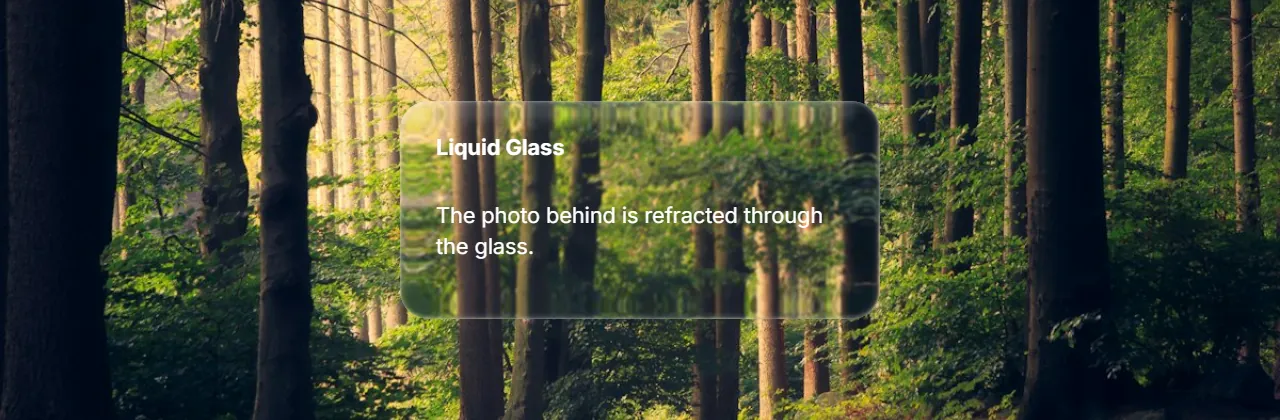
Table of contents
What does Liquid Glass do?
Nine presets act as a quick mode. Switch to Customize to set the lens profile, refraction, bezel width, blur, edge shine and corner radius yourself.
Liquid Glass is an extension: it adds settings to Elementor's own elements instead of adding a new widget. Turn it on or off for the whole site under MoxKit > Extensions.
Features
- Nine presets: Soft ripple, Deep glass, Crystal flow, Heavy distortion, Liquid mist, Vertical wave, Horizontal flow, Glass storm, Molten glass.
- Glass mode: auto, refract, frost or off; separate setting for tablet and mobile.
- Lens profiles: squircle, convex, concave, lip, ripple, vertical, horizontal, faceted, molten.
- Refraction, bezel width, blur, edge shine, corner radius and frosted blur strength.
- The script loads only on pages that use Liquid Glass.
How to use the Elementor glassmorphism effect
- Make sure Liquid Glass is enabled under MoxKit > Extensions.
- Put the Container over something colorful: a background image, a gradient or a video.
- Select the Container and open Style > Liquid Glass.
- Turn on Enable Liquid Glass and choose a preset.
- Click Update to save the page.
Liquid Glass settings
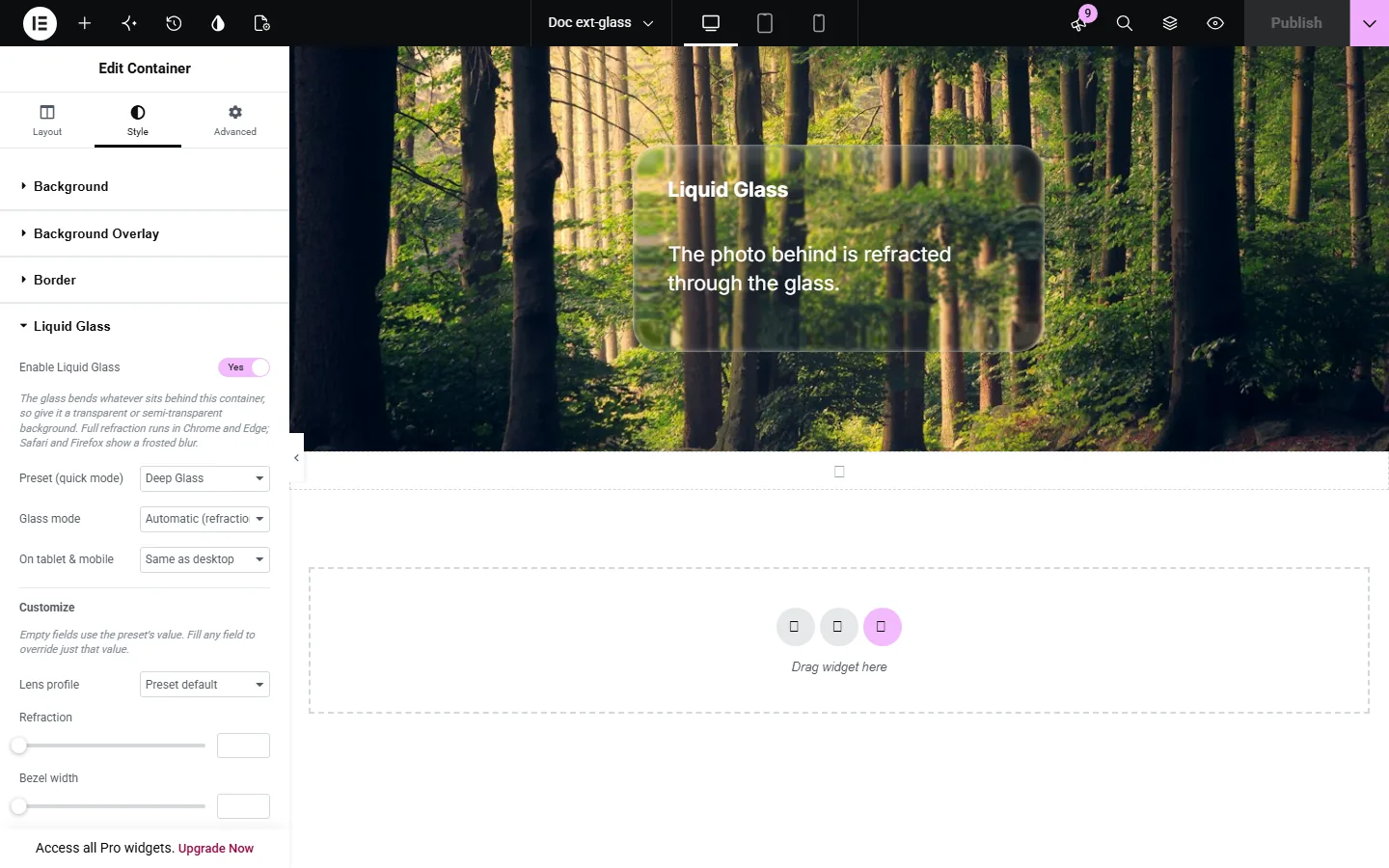
All settings live in Container > Style > Liquid Glass.
| Setting | Type | Options and notes |
|---|---|---|
| Enable Liquid Glass | Toggle | On / Off |
| Preset (quick mode) | Select | Soft Ripple, Deep Glass, Crystal Flow, Heavy Distortion, Liquid Mist, Vertical Wave, Horizontal Flow, Glass Storm, Molten Glass (default: Crystal Flow) |
| Glass mode | Select | Automatic (refraction where supported), Refraction only, Frosted blur only, Off (compare) (default: Automatic (refraction where supported)) |
| On tablet & mobile | Select | Same as desktop, Frosted blur only, Off (default: Same as desktop) |
| Customize | ||
| Lens profile | Select | Preset default, Squircle, Convex, Concave, Raised lip, Ripple, Vertical flutes, Horizontal flutes, Faceted, Molten |
| Refraction | Slider | |
| Bezel width | Slider | |
| Blur | Slider | |
| Edge shine | Slider | |
| Corner radius | Slider | |
| Frosted blur strength | Slider | |
Browser support for the Elementor glassmorphism effect
Chrome, Edge and other Chromium browsers render the full lens: the backdrop is bent through an SVG displacement filter, with a bright bezel and edge shine. Safari and Firefox do not support SVG filters on the backdrop, so MoxKit shows a frosted glass (backdrop blur with a soft highlight) there. Nothing breaks; the Container simply looks frosted instead of refracted. You can also force Frost everywhere with Glass mode.
Performance
The refraction runs on the GPU, but large glass areas over video can still be heavy on older phones. Use the On tablet & mobile setting to choose Frost or Off on small screens. The Liquid Glass script is loaded only on pages that contain a glass Container, so the rest of your site is unaffected.
Presets or custom values
Presets are a quick mode: each sets a lens profile, refraction, bezel, blur and shine that work well together. Choose Customize when you want to fine-tune one value, for example a stronger blur for long text or a larger radius to match rounded cards. The values you change override the preset.
Tips
- Glass needs something behind it. Place the glass Container inside a parent Container with a background image.
- Use white text with a subtle shadow for contrast.
- Choose "Frost" on tablet and mobile if you want the lightest effect on small devices.
Summary
The Elementor glassmorphism effect comes free with MoxKit Addons for Elementor. Switch it on under MoxKit > Extensions, open Container > Style > Liquid Glass and pick the options described above. It works with the free version of Elementor.
Liquid Glass FAQ
Which browsers show the refraction?
Chrome and Edge show the full lens refraction. Safari and Firefox show a frosted glass fallback.
Does it slow down the page?
The script loads only on pages that use it, and you can switch to Frost or Off on tablets and phones.