
Elementor Statistics Widget
Updated · MoxKit 1.4.4 · Download free on WordPress.org
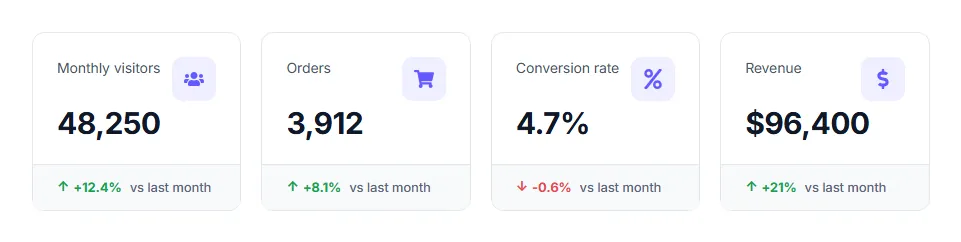
The Elementor statistics widget displays a grid of KPI cards, like a dashboard summary on a landing page. Each card has a title, a value, an optional icon, an optional "from" value and a growth figure that turns green for up and red for down.
- Widget name MoxKit Statistics
- Panel category MoxKit Addons
- Settings 29+
- Requires Elementor 3.25+ (free)
- Price Free
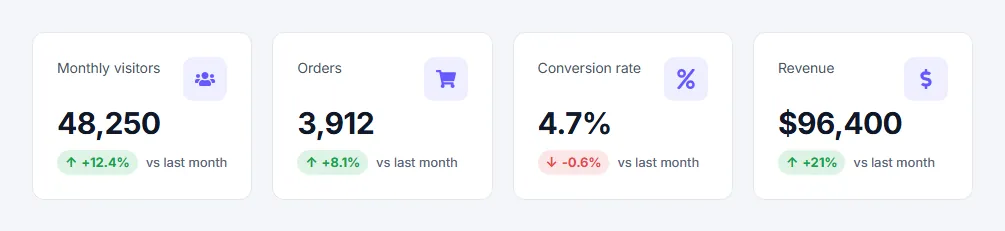
Table of contents
What is the Elementor statistics widget?
Use it for traffic numbers, sales results, case-study outcomes or any metric where the change matters as much as the number.
Like every MoxKit widget, the Statistics has Content and Style tabs with responsive settings, typography, colors and box styling, and it keeps Elementor's Advanced tab. You can switch it off under MoxKit > Widgets if you do not use it; a disabled widget loads no files.
Key features
- Unlimited metrics with icon, title, value, "from" value, trend (up, down, none), change and growth label.
- Default or stacked layout, 1–5 columns.
- Growth shown as a colored pill or as text.
- Themed up/down colors and arrow size.
- Card, icon, title, value and growth styling.
How to add the Elementor statistics widget
Follow these steps to add the widget to a page. You need MoxKit Addons for Elementor installed and Elementor active.
- Open the page in Elementor (Pages > Edit with Elementor).
- In the widget panel, search for "Statistics" or scroll to the MoxKit Addons category.
- Drag the Statistics widget into a Container.
- Edit the Metrics list: icon, title, value, trend and change for each card.
- Choose the Layout and number of Columns.
- In Style > Growth set the colors for up and down trends.
- Click Update (or Publish) to save the page.
Designs and examples
These screenshots were taken from a live WordPress site running MoxKit 1.4.4 and Elementor. They show the Statistics with the settings described in each caption.
Elementor statistics widget settings: Content tab
The Content tab holds what the widget shows and how it behaves. It has 1 sections and about 4 settings. Settings marked per device can have a different value on desktop, tablet and mobile.
Statistics
| Setting | Type | Options and notes |
|---|---|---|
| Layout | Select | Default, Stacked (growth footer) (default: Default) |
| Columns per device | Select | 1, 2, 3, 4, 5 (default: 4) |
| Growth as pill | Toggle | On / Off (default: On) |
| Metrics | List | Each item: Icon (optional), Title, Value, From value (optional), Growth, Change, Growth label (optional) |
Elementor statistics widget settings: Style tab
The Style tab controls the look of every part of the widget: 4 sections, about 25 settings. Elementor's own Advanced tab (margin, padding, motion effects, responsive visibility, custom CSS) is available as usual.
Card
| Setting | Type | Options and notes |
|---|---|---|
| Gap between cards per device | Slider | |
| Background | Group | All the usual Elementor background settings. |
| Border | Group | All the usual Elementor border settings. |
| Box shadow | Group | All the usual Elementor box shadow settings. |
| Border radius per device | Spacing | |
| Padding per device | Spacing | |
| Footer background (stacked) | Color | |
| Footer / border color | Color |
Icon
| Setting | Type | Options and notes |
|---|---|---|
| Icon size per device | Slider | |
| Icon color | Color | |
| Icon background | Color | |
| Icon box size per device | Slider | |
| Icon box radius per device | Slider |
Title & value
| Setting | Type | Options and notes |
|---|---|---|
| Typography | Group | All the usual Elementor typography settings. |
| Title color | Color | |
| Typography | Group | All the usual Elementor typography settings. |
| Value color | Color | |
| From value color | Color | |
| Typography | Group | All the usual Elementor typography settings. |
| Header to value spacing per device | Slider |
Growth
| Setting | Type | Options and notes |
|---|---|---|
| Up color | Color | |
| Down color | Color | |
| Growth label color | Color | |
| Typography | Group | All the usual Elementor typography settings. |
| Arrow size per device | Slider |
Tips and best practices
- Keep values short (48.2k, $96,400, 4.7%).
- Use the growth label for context, for example "vs last month".
- For a single animated number use the Counter widget instead.
Statistics FAQ
Do the numbers count up?
No, Statistics shows static values. Use the Counter widget for animated numbers.
Can I show a decrease?
Yes. Set Trend to Down; it uses the down color from Style > Growth.
How many columns can I use?
From 1 to 5, set per device.
Summary
The Elementor statistics widget in MoxKit is free, works with the free version of Elementor and loads its files only on pages that use it. Stat cards with icon, value, a "from" value and up or down growth, in default or stacked layouts. Install MoxKit Addons for Elementor from WordPress.org, drag the Statistics widget onto a page and start with the settings above.