
Elementor Stacked Cards (Card Deck Widget)
Updated · MoxKit 1.4.4 · Download free on WordPress.org
The Card Deck widget shows Elementor stacked cards: the front card is dealt to the back of the deck on a timer, by swipe, or with previous/next buttons and dots. The cards behind peek out from the bottom or top.
- Widget name MoxKit Card Deck
- Panel category MoxKit Addons
- Settings 40+
- Requires Elementor 3.25+ (free)
- Price Free
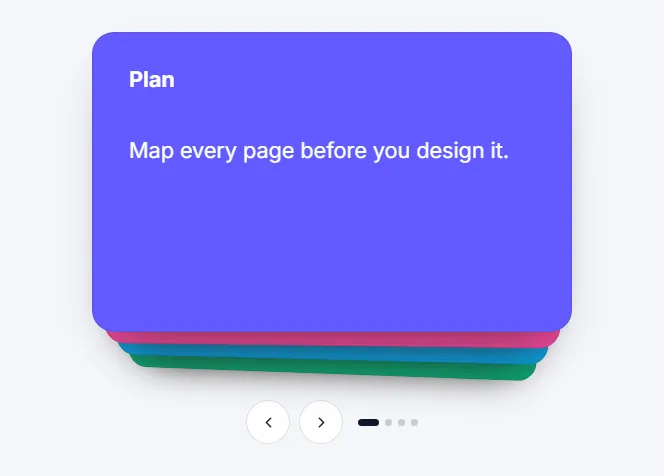
Table of contents
What is the Elementor stacked cards?
Every card is an editable Container, so it can hold headings, images, buttons or any other widget.
Like every MoxKit widget, the Card Deck has Content and Style tabs with responsive settings, typography, colors and box styling, and it keeps Elementor's Advanced tab. You can switch it off under MoxKit > Widgets if you do not use it; a disabled widget loads no files.
Key features
- Cards as editable nested Containers.
- Autoplay with time per card, pause on hover and focus, and a pause/play button.
- Swipe, previous/next buttons and dots.
- Exit direction (left, right, up, down) and stack position.
- Stack offset, scale, tilt and darkening; speed and easing.
- Card, button and dot styling.
How to add the Elementor stacked cards
Follow these steps to add the widget to a page. You need MoxKit Addons for Elementor installed and Elementor active.
- Open the page in Elementor (Pages > Edit with Elementor).
- In the widget panel, search for "Card Deck" or scroll to the MoxKit Addons category.
- Drag the Card Deck widget into a Container.
- Edit the cards in the Cards list and drop widgets into each card on the canvas.
- Under Deck set the timer, exit direction and controls.
- Style the stack and cards in the Style tab.
- Click Update (or Publish) to save the page.
Elementor stacked cards settings: Content tab
The Content tab holds what the widget shows and how it behaves. It has 2 sections and about 12 settings. Settings marked per device can have a different value on desktop, tablet and mobile.
Cards
| Setting | Type | Options and notes |
|---|---|---|
| Cards | Nested-Elements-Repeater |
Deck
| Setting | Type | Options and notes |
|---|---|---|
| Cycle automatically | Toggle | On / Off (default: On) |
| Time per card (seconds) | Slider | |
| Pause on hover and focus (hover) | Toggle | On / Off (default: On) |
| Front card leaves to the | Select | Left, Right, Top, Bottom (default: Left) |
| Cards behind peek out | Select | Below, Above (default: Below) |
| Cards visible in the stack | Slider | |
| Swipe to change card | Toggle | On / Off (default: On) |
| Previous / next buttons | Toggle | On / Off (default: On) |
| Pause / play button | Toggle | Content that moves by itself for more than five seconds should have a way to stop it. On / Off (default: On) |
| Dots | Toggle | On / Off (default: On) |
| Accessible label | Text | Name read by screen readers for the whole deck. |
Elementor stacked cards settings: Style tab
The Style tab controls the look of every part of the widget: 3 sections, about 28 settings. Elementor's own Advanced tab (margin, padding, motion effects, responsive visibility, custom CSS) is available as usual.
Deck
| Setting | Type | Options and notes |
|---|---|---|
| Width per device | Slider | |
| Alignment per device | Choice | Start, Center, End |
| Step between cards per device | Slider | |
| Shrink per card | Slider | |
| Tilt per card (degrees) | Slider | |
| Darken per card | Slider | |
| Animation duration (ms) | Slider | |
| Easing | Select | Fast start, soft landing, Smooth, Spring (slight overshoot), Ease |
| Tilt while leaving (degrees) | Slider |
Card
| Setting | Type | Options and notes |
|---|---|---|
| Minimum height per device | Slider | Every card is as tall as the tallest one. |
| Padding per device | Spacing | |
| Background | Group | All the usual Elementor background settings. |
| Border | Group | All the usual Elementor border settings. |
| Border radius per device | Slider | |
| Box shadow | Group | All the usual Elementor box shadow settings. |
Buttons and dots
| Setting | Type | Options and notes |
|---|---|---|
| Alignment per device | Choice | Start, Center, End |
| Space above per device | Slider | |
| Button size per device | Slider | |
| Button radius per device | Slider | |
| Color | Color | |
| Background | Color | |
| Border color | Color | |
| Color (hover) | Color | |
| Background (hover) | Color | |
| Border color (hover) | Color | |
| Dot color | Color | |
| Current dot color | Color | |
| Dot size per device | Slider |
Tips and best practices
- Give each card a different background color for a playful deck.
- Keep the pause button on when autoplay is on; it helps accessibility.
Card Deck FAQ
Can visitors swipe the cards?
Yes. Swipe is on by default.
Can I stop autoplay?
Turn off Cycle automatically, or let visitors use the pause button.
Summary
The Elementor stacked cards in MoxKit is free, works with the free version of Elementor and loads its files only on pages that use it. A deck that deals its front card to the back on a timer, by swipe or with buttons. Every card is a Container. Install MoxKit Addons for Elementor from WordPress.org, drag the Card Deck widget onto a page and start with the settings above.